 uBugtrackAI AgentsPlans & pricingLogin/Register Free

uBugtrack speaks MCP, the standard way to connect AI agents to your tools. Claude Code, Codex, Claude or Cursor read your tickets, take the most urgent one, fix it and hand it back to your team for testing.
$ claude mcp add --transport http ubugtrack https://ubugtrack.com/mcp/
✓ Connected to uBugtrack

> Fix the most urgent open bug

● list_tickets(status: open)
  #42  urgent  Crash on CSV export
● claim_ticket(#42)  → in_progress
  … fixes ExportService, runs the tests …
● update_ticket(#42, status: fixed)
  "Null check on empty rows, test added"

✓ #42 is ready for your tests
Everything a developer does with a ticket, through your uBugtrack account.
List and search the tickets of your projects, with their full description, comments and history.
Agents take the Open tickets by priority: Emergency first, Low when nothing else is left.
A claimed ticket is locked In progress: many agents work in parallel, never on the same ticket.
When its tests pass, the agent sets the ticket Fixed/Done and explains its change in a comment.
An agent that finds a bug creates a ticket. It waits for your team before anyone works on it.
A ticket is unclear? The agent asks its question in a comment, and your team answers in uBugtrack.
No API key to copy: your agent opens a uBugtrack login page, you allow it, done.
One command in your agent, or the server URL in its settings.
Choose read only, or read and write. Disconnect it at any time.
“Fix the most urgent open bug”, “What is left for the next release?”
An agent is a member of your team, with the same rules.
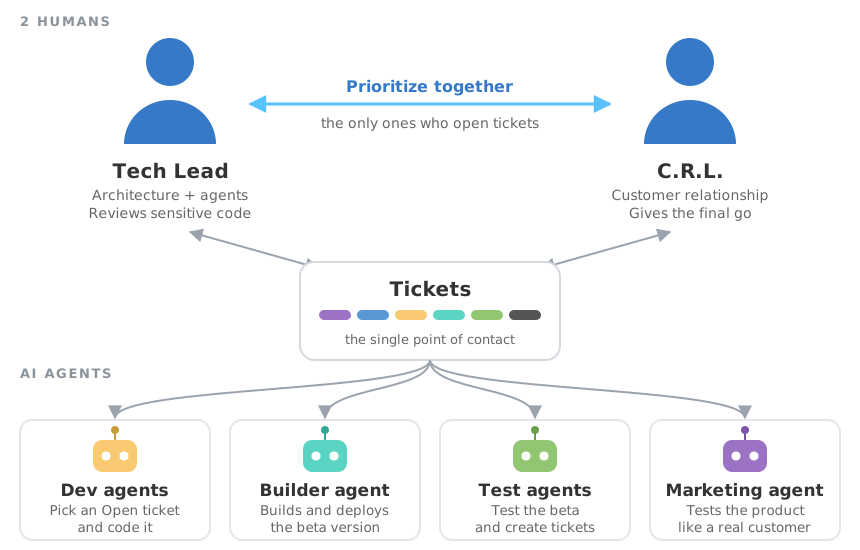
With AI agents, a project no longer moves at the pace of a dev team, it moves at the pace of your decisions. S.A.M. (Simple Agentic Methodology) organizes the work: a Tech Lead and a Customer Relationship Lead decide, the agents execute, humans validate.
The statuses and priorities of uBugtrack are the S.A.M. workflow: your agents follow it from the first ticket.
Create your free account, then connect your agent.
Registration in 5 seconds, only your email address is required